

Add a mascot that celebrates progress and welcomes users back
Build a daily habit dashboard with saved progress and a short celebration after each new completion. Pip returns to idle when the animation ends. A later visit changes the greeting without generating another clip.
A little progress, every day.
Build a routine that feels good. One small intention at a time.
A few good things for you.
Download the complete React source and media · Detailed integration tutorial
What to build
Your website owns the forms, saved data and user actions. Masko v1 generates the character and transparent clips while you build. Published playback needs no API key and no generation call per visitor. The preview stores progress in this browser.
1. Create the reference

Copy this character prompt into Studio, or send it as prompt to Masko v1. Replace the name and brand details for your own product.
A round lilac axolotl with coral gills, a mint scarf and a small yellow star badge, large dark eyes, short rounded limbs, soft clay-like 3D material, warm smile, full body centered, no text or extra props.Use a write key from API keys in MASKO_API_KEY, and an existing PROJECT_ID from GET /v1/projects. Run generation in a terminal or on your server.
curl -X POST "https://api.masko.ai/v1/mascots" \
  -H "Authorization: Bearer $MASKO_API_KEY" \
  -H "Masko-API-Version: 2026-09-26" \
  -H "Content-Type: application/json" \
  -H "Idempotency-Key: pip-reference-001" \
  -d '{
  "project_id": "PROJECT_ID",
  "name": "Pip",
  "prompt": "A round lilac axolotl with coral gills, a mint scarf and a small yellow star badge, large dark eyes, short rounded limbs, soft clay-like 3D material, warm smile, full body centered, no text or extra props.",
  "settings": {
    "cdn_enabled": true,
    "animation_sizes": [
      720,
      360
    ]
  }
}'
Save data.id as MASCOT_ID and the first data.reference_asset_ids entry as REFERENCE_ASSET_ID. This request generates a reference image. Inspect it before animating; preview options first if you want a choice.
2. Map the interaction states
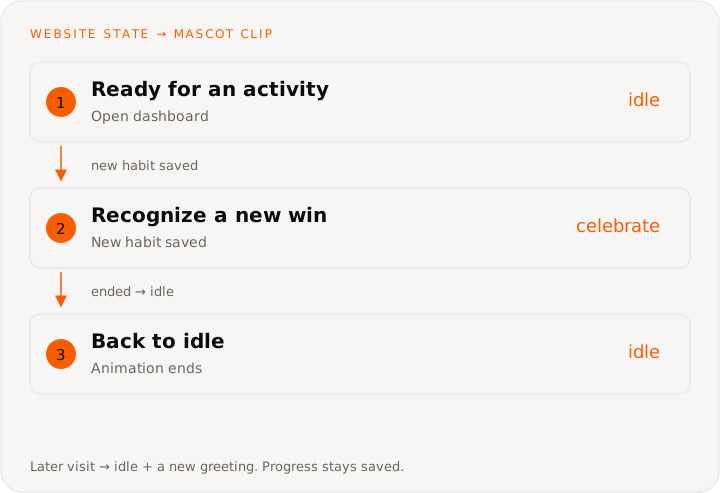
Use just two media states: idle and celebrate. When the celebration ends, return to the same idle clip. On a later visit, reuse idle with a new written greeting. Save each habit once per calendar day, then replay the celebration for a new completion. Increment a daily milestone only after all three distinct habits are complete. Returning visits preserve the history and change the text.
This diagram describes the website’s state machine. You do not need to create a Masko canvas or send these UI events to the generation API.
| Website state | Clip | Trigger |
|---|---|---|
| Ready for an activity | idle | Open dashboard |
| Recognize a new win | celebrate | New habit saved |
| Back to idle | idle | Animation ended |
| Welcome the next visit | idle | Later calendar day |
3. Generate the animation set
Start with a five-second Standard idle loop from the approved reference. The animation prompt describes movement; the reference supplies the character’s identity.
Subtle breathing, a friendly blink and a tiny relaxed sway. Keep the full body centered and the camera still. End in the starting pose for a seamless loop.curl -X POST "https://api.masko.ai/v1/mascots/MASCOT_ID/generate" \
-H "Authorization: Bearer $MASKO_API_KEY" \
-H "Masko-API-Version: 2026-09-26" \
-H "Content-Type: application/json" \
-H "Idempotency-Key: pip-idle-001" \
-d '{
"type": "animation",
"name": "Idle",
"source_image_asset_id": "REFERENCE_ASSET_ID",
"animation_model": "standard",
"animation_prompt": "Subtle breathing, a friendly blink and a tiny relaxed sway. Keep the full body centered and the camera still. End in the starting pose for a seamless loop.",
"duration": 5,
"loop": true
}'Save data.job_id, data.item_id and data.asset_ids. Each paid request needs its own idempotency key; retry an uncertain request with the same key and identical body.
Create the one-shot celebration
Two small joyful hops, arms raised, then settle with a proud smile in the starting pose. Preserve the lilac body, coral gills, mint scarf and star badge. No camera movement, text or extra props.curl -X POST "https://api.masko.ai/v1/mascots/MASCOT_ID/generate" \
-H "Authorization: Bearer $MASKO_API_KEY" \
-H "Masko-API-Version: 2026-09-26" \
-H "Content-Type: application/json" \
-H "Idempotency-Key: pip-celebrate-001" \
-d '{
"type": "animation",
"name": "Celebrate",
"source_image_asset_id": "REFERENCE_ASSET_ID",
"animation_model": "standard",
"animation_prompt": "Two small joyful hops, arms raised, then settle with a proud smile in the starting pose. Preserve the lilac body, coral gills, mint scarf and star badge. No camera movement, text or extra props.",
"duration": 5,
"loop": false
}'Pip uses no voice or talking request in this example. “Welcome back” is written text over the existing idle clip.
4. Wait for ready files
Poll each returned job ID without resending generation. If a wait times out, repeat the GET until data.status is completed or failed.
curl "https://api.masko.ai/v1/jobs/JOB_ID?wait=true&timeout=30" \
  -H "Authorization: Bearer $MASKO_API_KEY" \
  -H "Masko-API-Version: 2026-09-26"
Check the WebM and HEVC assets you intend to serve with GET /v1/assets/ASSET_ID; a finished MP4 alone is not enough. For hosted files, read the mascot’s export:
curl "https://api.masko.ai/v1/mascots/MASCOT_ID/cdn-export" \
  -H "Authorization: Bearer $MASKO_API_KEY" \
  -H "Masko-API-Version: 2026-09-26"
Use data.items[].animations[].transparent_video_webm for Chrome, Firefox and Edge, and transparent_video_mov for Safari. The export contains only ready hosted files; cdn_export_not_ready means hosting or publication is not ready. You can also download the files into your app’s public/ directory. Do not ship expiring signed URLs.
5. Connect the player and product events
Copy src/ and public/website-use-cases/ from the source download, then render the complete example:
import { WebsiteMascotDemo } from './WebsiteMascotDemo';

export default function Example() {
  return <WebsiteMascotDemo kind="progress" />;
}
Save progress to the signed-in account. Use the user’s timezone for daily boundaries and idempotent writes for habit completion. The demo uses browser storage; Come back tomorrow previews the next date.
Replace media URLs in website-mascots.ts with your own files. The two-player component keeps the previous frame visible until the next clip decodes, starts muted and respects reduced motion. The integration tutorial shows the React event wiring.
Copy this prompt into Lovable or another coding agent
Build Little Wins, a daily habit website with cream and sage surfaces, lilac accents and a calm landscape banner. Use Masko v1 to create Pip, a lilac axolotl with coral gills and a mint scarf. Generate only an idle loop and a one-shot celebration. Save each habit once per day, celebrate new completions, count one milestone for a fully completed day, and return to idle on the video ended event. On a later visit, reuse idle with a welcoming written message. Preserve history and avoid guilt for missed days.

Follow https://masko.ai/docs/use-cases/web-progress-companion.
Use the REST API at https://api.masko.ai/v1 and inspect
https://api.masko.ai/v1/openapi.json for request shapes.
Read https://masko.ai/llms-full.txt for generation and playback guidance.
Keep MASKO_API_KEY on the server and never print it.
Show the generation costs before creating paid media.
Wait for jobs and transparent formats, then download or publish the files.
Use the finished files in the browser; do not generate on visitor actions.
Keep captions and written answers usable without sound.
Verify and measure
Complete a habit, reload and check the saved count. A completed habit must not award another win. Finish the day, preview tomorrow and check that the previous milestone remains.
Check keyboard use, mobile layout, reduced motion, WebM and Safari playback, plus a media failure with a visible still-image fallback.
Measure return visits, completed activities and continued use over several weeks. Compare with a version without the companion; do not treat mascot clicks as proof of improved retention.
Generation spends your account’s credits; published file playback adds no generation charge. Use current pricing and the talking estimate for your own recipe.