
Add a talking support mascot in the bottom right
Build Leaf & Loom’s bottom-right support widget with Fern, a terracotta plant pot. A click opens help, the visitor chooses care or delivery, and a human handoff remains available.
 Thoughtfully grown. Naturally at home.
Bring a little
outside in.
Meet the easygoing rubber plant. Glossy leaves, a slow pace, and very little fuss.

Reference prompts and Masko v1 recipe · Download the full React examples
What you will build
A responsive web interface with a new brand character, working interactions and transparent video playback. This tutorial uses Leaf & Loom, a fictional product. The demo is free to try; generating your own assets spends your Masko credits.
What you need: a React app, a Masko account, and a mascot’s published files or local downloads. Use Studio for generation, or keep a write API key on your server. Never ship the key in browser code.
Create Fern for your brand
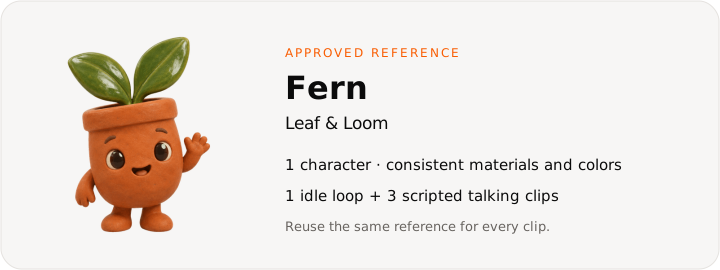
Copy this reference prompt:
A friendly little terracotta plant pot with two jade leaves, large dark eyes, a small smiling mouth, short rounded arms and feet, warm clay texture, full character centered, soft 3D lighting, no text or extra props.A little terracotta pot with jade leaves and a warm voice. Fern knows when to explain plant care and when to hand the conversation to a person.
Create the reference in Studio, or follow Create a mascot from text. Keep the approved image as the mascot’s reference so future poses share its identity. The downloaded examples include the completed demonstration media; replace the files when you make your own character.
Map the interaction states
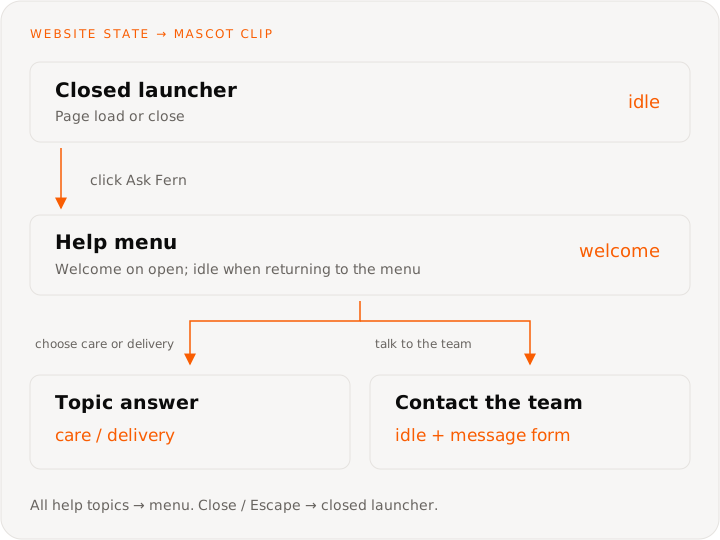
Keep panel visibility, selected topic and team contact as website state. All help topics returns to the menu. Closing or Escape returns focus to the launcher. Topic clips play once; the demo holds the last frame, and Hear Fern replays the line. Team contact uses the idle clip and a message form.
These are website interaction states. Masko v1 creates the media; your app chooses which clip to show. Copy the v1 requests for character creation, generation and file delivery.
Make the animation set
| Clip or moment | Performance or spoken line | Trigger |
|---|---|---|
| Greeting | “Hi, I’m Fern. Looking for plant care or delivery help?” | The visitor opens help |
| Plant care | “Give your plant bright, indirect light. Check the soil before watering. Each plant comes with its own care card.” | Care selected |
| Delivery | “Our example shop dispatches plants in two working days, packed with care. Your confirmation email has the tracking link.” | Delivery selected |
Create a five-second idle loop from your approved image. Keep the camera still and the full character inside the frame. Then make the three talking clips below.
A tiny relaxed sway and a friendly blink; the jade leaves move gently. Keep the pot, arms and feet consistent. Full character in frame, still camera, seamless loop.Animate an existing image to avoid paying for a new pose when you already have the right one. Inspect the results before putting them in your interface.
Give Fern a voice and record the lines
In Studio, open Context & References → Voice → Add a voice. Try this description:
A warm, practical adult voice with a gentle British accent, relaxed conversational pace.Hear the samples and keep one. Each voice sample set costs 1 credit. For each line in the recipe table, create a Talking animation from the welcome pose. Add movements in brackets, such as [waves gently, warm], and request a cost estimate before generating.
For an API or coding agent, use the talking tutorial for voice samples, voice selection and job polling. Once the mascot has a voice, this request estimates one clip:
// Run on your server. Keep this helper out of browser code.
async function masko(path: string, body: object, operationId: string) {
  const response = await fetch(`https://api.masko.ai/v1${path}`, {
    method: 'POST',
    headers: {
      Authorization: `Bearer ${process.env.MASKO_API_KEY}`,
      'Content-Type': 'application/json',
      'Idempotency-Key': operationId
    },
    body: JSON.stringify(body)
  });
  const result = await response.json();
  if (!response.ok) throw new Error(result.error?.message ?? 'Request failed');
  return result.data;
}

const request = {
  type: 'animation',
  item_id: welcomeItemId,
  speech: {
    script:
      '[waves gently, warm] Hi, I’m Fern. Looking for plant care or delivery help?'
  }
};
const estimate = await masko(
  `/mascots/${mascotId}/generate`,
  {
    ...request,
    dry_run: true
  },
  crypto.randomUUID()
);
// Review estimate.estimate before sending the paid request.
// Use a unique Idempotency-Key and the identical body on retries.
Generate your actual scripted lines from the table, not the example greeting above. Wait for the job and its WebM and HEVC files to complete before adding the result to the app.
Get files that are ready to ship
Download the transparent PNG, WebM and HEVC files into your project, or publish them to get stable CDN URLs. A completed MP4 alone is not proof that the transparent versions are ready: check the assets you intend to serve. Signed private URLs expire and should not be hardcoded into a shipped app.
The source download uses /website-use-cases/ for media. Copy that directory to your app’s public/ folder, or change the URLs in website-mascots.ts to your published files. WebM serves Chrome, Firefox and Edge; HEVC with alpha serves Safari.
Connect it to your web app
Use a button as the launcher and keep the panel closed until the visitor chooses help. Fern appears beside the launcher when closed and inside the panel when opened. The widget stays inside the demo’s shop; on a real website, position the widget relative to the viewport with room for mobile safe areas.
This small component shows the event wiring with local state. The source download includes the complete layout and production integration points.
import { useRef, useState } from 'react';
import { WebsiteMascotPlayer } from './WebsiteMascotPlayer';
import { websiteMascotStories } from './website-mascots';

const fern = websiteMascotStories[2];
const answers = {
  welcome: 'Hi, I’m Fern. Looking for plant care or delivery help?',
  care: 'Give your plant bright, indirect light. Check the soil before watering. Each plant comes with its own care card.',
  delivery:
    'Our example shop dispatches plants in two working days, packed with care. Your confirmation email has the tracking link.'
};

export function ShopHelp() {
  const [open, setOpen] = useState(false);
  const [topic, setTopic] = useState<keyof typeof answers>('welcome');
  const launcher = useRef<HTMLButtonElement>(null);

  function close() {
    setOpen(false);
    launcher.current?.focus();
  }

  return (
    <div
      onKeyDown={(event) => {
        if (event.key === 'Escape') close();
      }}
    >
      <button
        ref={launcher}
        aria-expanded={open}
        aria-controls={open ? 'shop-help' : undefined}
        onClick={() => {
          setTopic('welcome');
          setOpen(true);
        }}
      >
        Ask Fern
      </button>
      {open && (
        <section id="shop-help" aria-label="Fern’s help">
          <button onClick={close}>Close support</button>
          <WebsiteMascotPlayer name="Fern" clip={fern.clips[topic]} />
          <p aria-live="polite">{answers[topic]}</p>
          <button onClick={() => setTopic('care')}>Plant care</button>
          <button onClick={() => setTopic('delivery')}>
            Delivery & orders
          </button>
        </section>
      )}
    </div>
  );
}
The downloaded example includes a close control, Escape handling, focus returning to the launcher, topic buttons, captions and a local message preview. It never sends a customer message. Replace that preview with your support provider’s SDK or a server endpoint, and confirm successful delivery before telling the visitor the message was sent.
The written answer is the source of truth. These talking clips contain prewritten lines. Your existing chatbot or help service supplies dynamic answers; Masko’s build-time connection does not turn those answers into live lip-synced speech.
Use the full design and player
Download the React source and generated media. It contains all three independent designs. Choose support for this tutorial:
import { WebsiteMascotDemo } from './WebsiteMascotDemo';

export default function Example() {
  return <WebsiteMascotDemo kind="support" />;
}
The archive includes the components, CSS module, media configuration, browser format selector and a README. No Masko SDK is needed for playback. Import the CSS module beside the components and keep your app’s existing React setup.
The player keeps two video elements mounted. It prepares the next clip and swaps only after a decoded frame exists, so the visible character remains while a new animation loads. A one-shot completion follows ended, not an estimated timer. See smooth playback for the transition contract.
Sound starts muted. Visitors can enable it explicitly, and spoken lines remain visible as text. Playback pauses offscreen and when the browser tab is hidden. With reduced motion, the character stays still until the visitor asks to play it.
Check the finished experience
Open help with the keyboard, choose both topics, and check that the text and clip match. Close with Escape and confirm focus returns to the launcher. Try it on a narrow screen and verify product controls remain reachable. Preview a message: the page must clearly say it was not sent.
Test muted, with sound, with reduced motion, and with a keyboard. Check a narrow mobile viewport and both WebM and Safari’s HEVC playback. A failed media request should leave the still image or previous frame visible and offer a retry.
Connect your real product
Replace the example care and delivery policies with your actual policies before publishing. Connect your support service, provide a human handoff, and keep a text fallback if video or sound cannot play.
Costs and what to measure
Budget 1 credit for the reference image, 10 for a five-second Standard idle loop from that image, 1 for a voice sample set, and 2 credits per second of talking. Three talking clips have a five-second minimum each, so this recipe starts at about 42 credits; the longer scripts in this example cost more. Use the talking estimate for your own lines.
Exports and playback of downloaded or published files add no generation cost. The tutorial catalog shows estimates, not the cost of a visitor’s session.
Compare answered questions, successful support handoffs and purchase completion. A friendly mascot can support trust, while accurate answers and clear service policies do the work.
Ask Lovable to build your version
Build a botanical ecommerce website called Leaf and Loom with forest green, cream and terracotta colors. Use Masko to create Fern, a friendly terracotta plant pot with jade leaves. Put Fern in the bottom right as a button that opens help. Add care and delivery topics with written answers and optional talking clips, plus a human support handoff. Keep checkout clear and sound off until clicked.

Follow https://masko.ai/docs/tutorials/web-support-mascot.
Use Masko v1 at https://api.masko.ai/v1 and inspect https://api.masko.ai/v1/openapi.json.
Use real generated files, keep generation credentials on the server,
and download or publish assets before shipping the app.
Reference prompts and Masko v1 recipe · All website use cases