
EXPLAINER VIDEOS
Make an AI explainer video.Starring your mascot.
Bo explains why the sky is blue, in his own voice. Watch it, then make one with your mascot.
Four steps. One explainer.
Masko makes the talking mascot. You bring the idea and the scenes.
- 1What Bo says
[stretches both arms far apart, happy] Red waves are long. [holds both paws close together, excited] Blue waves are short!
Write one idea per line
Go from what people know to the new idea.
- 2
Pick a voice by ear
Describe it, hear three samples, keep one.
- 3Generate · up to 24 credits

Make it talk
Put gestures and feelings in brackets. Bo acts them out.
- 4
Add your scenes
Place the transparent mascot beside your diagrams.
Steal Bo’s script.
Ten lines, one idea each. Copy the template for your topic.
01The question
[waves hello with a big smile, excited] Why is the sky blue? [taps chin, thinking, curious] Let's find out, step by step.
02What people already see
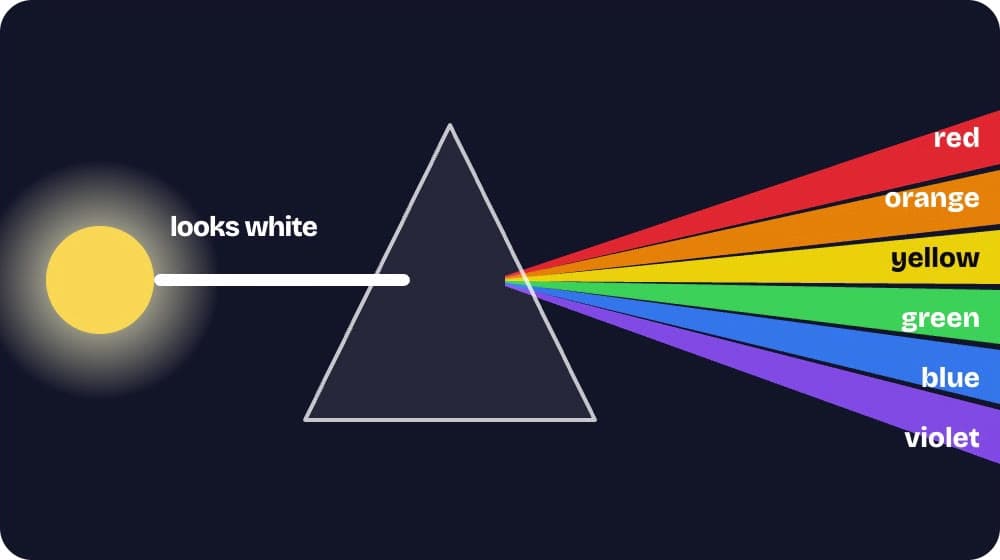
[points toward the right side of the frame, curious] First, sunlight. [shades eyes with one paw, curious] It looks white... [opens both arms wide, excited] but it's really a mix of all the colors of the rainbow!
03One new idea
[points toward the right side of the frame, calm] Each color travels as a wave. [stretches both arms far apart, happy] Red waves are long. [holds both paws close together, excited] Blue waves are short!
04The setting
[looks around in wonder, curious] Now, the air is full of tiny molecules... [points toward the right side of the frame, calm] mostly nitrogen and oxygen.
05The real word
[points toward the right side of the frame, curious] When light hits them, [bounces up and down, excited] some of it bounces off in every direction! [nods, proud] That's called scattering.
06The key
[leans in close, whispering] Here's the key... [jumps with excitement, excited] short blue waves scatter much more than long red ones!
07The answer
[looks up at the sky, curious] So scattered blue light reaches your eyes from all over the sky. [opens both arms wide, happy] That's why it looks blue!
08A harder question
[gasps with both paws on cheeks, surprised] But wait! Violet waves are even shorter. [scratches head, curious] Why isn't the sky purple? [points toward the right side of the frame, calm] Sunlight has less violet, and our eyes are less sensitive to it.
09A second case
[points toward the right side of the frame, calm] At sunset, light travels through much more air to reach you. [clasps paws together dreamily, happy] Most of the blue is scattered away... so only reds and oranges are left.
10The recap
[nods, proud] So remember: sunlight mixes every color, air scatters blue the most, [opens both arms wide, excited] and that blue fills the sky! [laughing] See you next time!
FOR DEVELOPERS
Or let your agent make it.
Claude Code, Codex or any coding agent can build the whole video through the Masko API.
# Add "dry_run": true to see the length and price first.
curl https://api.masko.ai/v1/mascots/MASCOT_ID/generate \
  -H "Authorization: Bearer $MASKO_API_KEY" \
  -H "Content-Type: application/json" \
  -d '{
    "type": "animation",
    "item_id": "START_POSE_ITEM_ID",
    "speech": {
      "script": "[stretches both arms far apart, happy] Red waves are long. [holds both paws close together, excited] Blue waves are short!"
    }
  }'
THE LITTLE DETAILS
A few questions.
we were hoping you’d ask.
How was this video made?
With Claude and the Masko API. Claude Code checked the facts and wrote the script, then called the Masko API to make Bo say each line in his own voice, one talking clip per step. It built the animated scenes in code, timed them to Bo’s transcripts, and rendered the video. We reviewed every step.
Can AI create an explainer video?
Yes, with a person checking it. AI helped write Bo’s script, Masko voiced and performed every line, and the scenes were built in code. We checked each fact against sources before publishing.
How much does it cost?
Talking costs 3 credits per second of video, and a free dry run shows the price first. This 99-second video used 245 credits, plus its voice samples.
See credits and pricingCan I use my own mascot and voice?
Yes. Upload your character, then pick its voice from three samples. Adding a voice unlocks after $50 spent on Masko. Some Marketplace mascots already have one.
Read the talking guideDoes Masko make the whole video?
Masko makes the talking mascot: transparent video, voice and a transcript with the time of every word. You add the scenes in your editor, or let a coding agent build them.
Is the lip sync exact?
The mouth follows speech and silence, not each syllable, and a gesture can land up to a second after its word.
YOUR TOPIC, YOUR MASCOT